

[Nov 06, 2022] Associate-Cloud-Engineer Questions Truly Valid For Your Google Exam!
Associate-Cloud-Engineer Actual Questions - Instant Download Tests Free Updated Today!
Configuring Access & Security
The last module of the certification exam measures the skills of the learners in managing identity & access management (IAM). Besides that, they should know how to perform the management of service accounts. They also need to be able to view audit logs for the project as well as managed services.
NEW QUESTION 79
You need to verify the assigned permissions in a custom IAM role. What should you do?
- A. Use the GCP Console, IAM section to view the information.
- B. Use the "gcloud init" command to view the information.
- C. Use the GCP Console, Security section to view the information.
- D. Use the GCP Console, API section to view the information.
Answer: A
Explanation:
A is correct because this is the correct console area to view permission assigned to a custom role in a particular project.
B is not correct because 'gcloud init' will not provide the information required.
C and D are not correct because these are not the correct areas to view this information
NEW QUESTION 80
You are the team lead of a group of 10 developers. You provided each developer with an individual Google Cloud Project that they can use as their personal sandbox to experiment with different Google Cloud solutions.
You want to be notified if any of the developers are spending above $500 per month on their sandbox environment. What should you do?
- A. Create a single budget for all projects and configure budget alerts on this budget.
- B. Create a budget per project and configure budget alerts on all of these budgets.
- C. Create a single billing account for all sandbox projects and enable BigQuery billing exports. Create a Data Studio dashboard to plot the spending per project.
- D. Create a separate billing account per sandbox project and enable BigQuery billing exports. Create a Data Studio dashboard to plot the spending per billing account.
Answer: B
Explanation:
Explanation/Reference: https://cloud.google.com/billing/docs/how-to/budgets
NEW QUESTION 81
For analysis purposes, you need to send all the logs from all of your Compute Engine instances to a BigQuery dataset called platform-logs. You have already installed the Stackdriver Logging agent on all the instances.
You want to minimize cost. What should you do?
- A. 1. Give the BigQuery Data Editor role on the platform-logsdataset to the service accounts used by your instances.
2. Update your instances' metadata to add the following value: logs-destination: bq://platform- logs. - B. 1. In Stackdriver Logging, create a filter to view only Compute Engine logs.
2. Click Create Export.
3. Choose BigQuery as Sink Service, and the platform-logsdataset as Sink Destination. - C. 1. In Stackdriver Logging, create a logs export with a Cloud Pub/Sub topic called logsas a sink.
2. Create a Cloud Function that is triggered by messages in the logstopic.
3. Configure that Cloud Function to drop logs that are not from Compute Engine and to insert Compute Engine logs in the platform-logsdataset. - D. 1. Create a Cloud Function that has the BigQuery User role on the platform-logsdataset.
2. Configure this Cloud Function to create a BigQuery Job that executes this query:
INSERT INTO dataset.platform-logs (timestamp, log)
SELECT timestamp, log FROM compute.logs
WHERE timestamp > DATE_SUB(CURRENT_DATE(), INTERVAL 1 DAY)
3. Use Cloud Scheduler to trigger this Cloud Function once a day.
Answer: B
NEW QUESTION 82
You need to connect to one of your Compute Engine instances using SSH. You've already authenticated gcloud, however, you don't have an SSH key deployed yet. In the fewest steps possible, what's the easiest way to connect to the app?
- A. Create a key with the ssh-keygen command. Then use the gcloud compute ssh command.
- B. Use the gcloud compute ssh command.
- C. Run gcloud compute instances list to get the IP address of the instance, then use the ssh command.
- D. Create a key with the ssh-keygen command. Upload the key to the instance. Run gcloud compute instances list to get the IP address of the instance, then use the ssh command.
Answer: B
NEW QUESTION 83
You are migrating a production-critical on-premises application that requires 96 vCPUs to perform its task. You want to make sure the application runs in a similar environment on GCP. What should you do?
- A. When creating the VM, use Intel Skylake as the CPU platform.
- B. Start the VM using Compute Engine default settings, and adjust as you go based on Rightsizing Recommendations.
- C. When creating the VM, use machine type n1-standard-96.
- D. Create the VM using Compute Engine default settings. Use gcloud to modify the running instance to have 96 vCPUs.
Answer: D
NEW QUESTION 84
You want to configure autohealing for network load balancing for a group of Compute Engine instances that run in multiple zones, using the fewest possible steps. You need to configure re- creation of VMs if they are unresponsive after 3 attempts of 10 seconds each. What should you do?
- A. Create an HTTP load balancer with a backend configuration that references an existing instance group.
Set the health check to healthy (HTTP) - B. Create an HTTP load balancer with a backend configuration that references an existing instance group.
Define a balancing mode and set the maximum RPS to 10. - C. Create a managed instance group. Set the Autohealing health check to healthy (HTTP)
- D. Create a managed instance group. Verify that the autoscaling setting is on.
Answer: C
Explanation:
Use separate health checks for load balancing and for autohealing. Health checks for load balancing detect unresponsive instances and direct traffic away from them. Health checks for autohealing detect and recreate failed instances, so they should be less aggressive than load balancing health checks. Using the same health check for these services would remove the distinction between unresponsive instances and failed instances, causing unnecessary latency and unavailability for your users.
https://cloud.google.com/compute/docs/tutorials/high-availability-autohealing
NEW QUESTION 85
You need to create a new development Kubernetes cluster with 4 nodes. The cluster will be named linux- academy-dev-cluster. Which of the following truncated commands will create a cluster?
- A. kubectl clusters create linux-academy-dev-cluster 4
- B. kubectl clusters create linux-academy-dev-cluster --num-nodes 4
- C. gcloud container clusters create linux-academy-dev- cluster --num-nodes 4
- D. gcloud container clusters create linux-academy-dev-cluster 4
Answer: C
NEW QUESTION 86
Your boss has asked you to set up the CFO as a user inside Google Cloud. Before walking away, she said, "And obviously you know which role to assign him."
Which role was she likely talking about, and why is it obvious? (Select one role and one reason)
- A. Role: Project Owner
- B. Role: Billing Account Admin
- C. Reason: This role will ensure the CFO has full access to the project.
- D. Reason:: This role will ensure the CFO can perform any billing task that they may need.
- E. Role: Billing Account Viewer
- F. Reason: This role will ensure the CFO has access to view the spending data.
Answer: E,F
NEW QUESTION 87
Your web application has been running successfully on Cloud Run for Anthos. You want to evaluate an updated version of the application with a specific percentage of your production users (canary deployment).
What should you do?
- A. Create a new revision with the new version of the application.
Add HTTP Load Balancer in front of both revisions. - B. Create a new service with the new version of the application.
Split traffic between this version and the version that is currently running. - C. Create a new service with the new version of the application.
Add HTTP Load Balancer in front of both services. - D. Create a new revision with the new version of the application.
Split traffic between this version and the version that is currently running.
Answer: B
NEW QUESTION 88
You need to set up permissions for a set of Compute Engine instances to enable them to write data into a particular Cloud Storage bucket. You want to follow Google-recommended practices.
What should you do?
- A. Create a service account and add it to the IAM role `storage.objectCreator' for that bucket.
- B. Create a service account with an access scope.
Use the access scope `https://www.googleapis.com/ auth/devstorage.write_only'. - C. Create a service account with an access scope.
Use the access scope `https://www.googleapis.com/ auth/cloud-platform'. - D. Create a service account and add it to the IAM role `storage.objectAdmin' for that bucket.
Answer: C
Explanation:
There are many access scopes that you can choose from but you can also just set the cloud- platform access scope, which is an OAuth scope for all Google Cloud services, and then securely limit the service account's access by granting it IAM roles.
https://cloud.google.com/compute/docs/access/service-accounts
NEW QUESTION 89
Your company has a Google Cloud Platform project that uses BigQuery for data warehousing. Your data science team changes frequently and has few members. You need to allow members of this team to perform queries. You want to follow Google-recommended practices. What should you do?
- A. 1. Create a dedicated Google group in Cloud Identity.
2. Add each data scientist's user account to the group.
3. Assign the BigQuery dataViewer user role to the group. - B. 1. Create a dedicated Google group in Cloud Identity.
2. Add each data scientist's user account to the group.
3. Assign the BigQuery jobUser role to the group. - C. 1. Create an IAM entry for each data scientist's user account.
2. Assign the BigQuery jobUser role to the group. - D. 1. Create an IAM entry for each data scientist's user account.
2. Assign the BigQuery dataViewer user role to the group.
Answer: A
Explanation:
Explanation/Reference: https://cloud.google.com/bigquery/docs/cloud-sql-federated-queries
NEW QUESTION 90
Your company publishes large files on an Apache web server that runs on a Compute Engine instance. The Apache web server is not the only application running in the project. You want to receive an email when the egress network costs for the server exceed 100 dollars for the current month as measured by Google Cloud Platform (GCP). What should you do?
- A. Export the billing data to BigQuery.
Create a Cloud Function that uses BigQuery to sum the egress network costs of the exported billing data for the Apache web server for the current month and sends an email if it is over 100 dollars.
Schedule the Cloud Function using Cloud Scheduler to run hourly. - B. Use the Stackdriver Logging Agent to export the Apache web server logs to Stackdriver Logging.
Create a Cloud Function that uses BigQuery to parse the HTTP response log data in Stackdriver for the current month and sends an email if the size of all HTTP responses, multiplied by current GCP egress prices, totals over 100 dollars. Schedule the Cloud Function using Cloud Scheduler to run hourly. - C. Set up a budget alert on the project with an amount of 100 dollars, a threshold of 100%, and notification type of "email."
- D. Set up a budget alert on the billing account with an amount of 100 dollars, a threshold of 100%, and notification type of "email."
Answer: A
Explanation:
The Apache web server is not the only application running in the project, so the budget alert is not suitable because it is related to all applications and not only the network traffic as needed.
NEW QUESTION 91
What is the gcloud command to create a cluster named ch09-cluster-10 with four nodes?
- A. gcloud clusters container create ch09-cluster-10 --num-nodes=4
- B. gcloud container clusters create ch09-cluster-10 --nodes-num=4
- C. gcloud container clusters create ch09-cluster-10 --num-nodes=4
- D. gcloud container clusters create ch09-cluster-10 4
Answer: C
NEW QUESTION 92
You are building an archival solution for your data warehouse and have selected Cloud Storage to archive your data. Your users need to be able to access this archived data once a quarter for some regulatory requirements.
You want to select a cost-efficient option. Which storage option should you use?
- A. Multi-Regional Storage
- B. Nearline Storage
- C. Regional Storage
- D. Cold Storage
Answer: D
Explanation:
Nearline, Coldline, and Archive offer ultra low-cost, highly-durable, highly available archival storage. For data accessed less than once a year, Archive is a cost-effective storage option for long-term preservation of data.
Coldline is also ideal for cold storage-data your business expects to touch less than once a quarter. For warmer storage, choose Nearline: data you expect to access less than once a month, but possibly multiple times throughout the year. All storage classes are available across all GCP regions and provide unparalleled sub-second access speeds with a consistent API.
Reference: https://cloud.google.com/storage/archival
NEW QUESTION 93
You deployed an App Engine application using gcloud app deploy, but it did not deploy to the intended project. You want to find out why this happened and where the application deployed. What should you do?
- A. Check the web-application.xml file for your application and check project settings.
- B. Check the app.yaml file for your application and check project settings.
- C. Go to Deployment Manager and review settings for deployment of applications.
- D. Go the Cloud Shell and run gcloud config list to review the Google Cloud configuration used for deployment.
Answer: B
NEW QUESTION 94
You deployed a new application inside your Google Kubernetes Engine cluster using the YAML file specified below.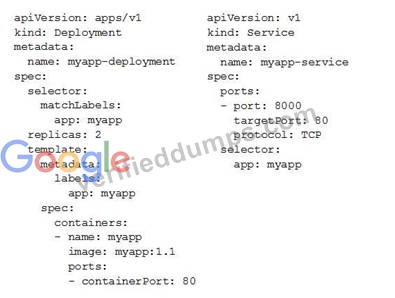
You check the status of the deployed pods and notice that one of them is still in PENDING status:
You want to find out why the pod is stuck in pending status. What should you do?
- A. Review details of the myapp-deployment Deployment object and check for error messages.
- B. View logs of the container in myapp-deployment-58ddbbb995-lp86m pod and check for warning messages.
- C. Review details of myapp-deployment-58ddbbb995-lp86m Pod and check for warning messages.
- D. Review details of the myapp-service Service object and check for error messages.
Answer: C
NEW QUESTION 95
You need to provide a cost estimate for a Kubernetes cluster using the GCP pricing calculator for Kubernetes. Your workload requires high IOPs, and you will also be using disk snapshots. You start by entering the number of nodes, average hours, and average days. What should you do next?
- A. Fill in local SSD. Add estimated cost for cluster management.
- B. Select Add GPUs. Fill in persistent disk storage and snapshot storage.
- C. Fill in local SSD. Fill in persistent disk storage and snapshot storage.
- D. Select Add GPUs. Add estimated cost for cluster management.
Answer: C
Explanation:
https://cloud.google.com/products/calculator#tab=container
NEW QUESTION 96
A company has an application that generates invoices and makes the invoices available online. Invoices are stored as PDFs in an Amazon S3 bucket. Customers typically only view each invoice during the month it is issued. However, past invoices need to be immediately available. There are concerns over rising storage costs as the company gains more customers.
What is the MOST cost-effective method to store the data?
- A. Use Amazon S3 for current invoices. Set up lifecycle rules to migrate invoices to Amazon S3 Standard- Infrequent Access (S3 Standard-IA) after 30 days.
- B. Store the invoices as text files. Use Amazon CloudFront to convert the invoices from text to PDF when customers download invoices.
- C. Store the invoices as binaries in an Amazon RDS database instance. Retrieve them from the database when customers request invoices.
- D. Use Amazon S3 for current invoices. Set up lifecycle rules to migrate invoices to the GLACIER storage class after 30 days.
Answer: A
NEW QUESTION 97
You built an application on your development laptop that uses Google Cloud services. Your application uses Application Default Credentials for authentication and works fine on your development laptop. You want to migrate this application to a Compute Engine virtual machine (VM) and set up authentication using Google- recommended practices and minimal changes. What should you do?
- A. Store credentials for service accounts with appropriate access for Google services in a config file, and deploy this config file with your application.
- B. Store credentials for your user account with appropriate access for Google services in a config file, and deploy this config file with your application.
- C. Create a service account with appropriate access for Google services, and configure the application to use this account.
- D. Assign appropriate access for Google services to the service account used by the Compute Engine VM.
Answer: C
Explanation:
Reference:
https://cloud.google.com/compute/docs/access/create-enable-service-accounts-for-instances
NEW QUESTION 98
......
Get instant access of 100% real exam questions with verified answers: https://www.verifieddumps.com/Associate-Cloud-Engineer-valid-exam-braindumps.html
Exam Dumps for the Preparation of Latest Associate-Cloud-Engineer Exam Questions: https://drive.google.com/open?id=1AZ5kBU241WpWbez5QKfUxEXu9-U5yLEO
